
Custom New Tab Redirect for Chrome
The Custom New Tab Redirect for Chrome extension allows users to replace the default new tab page with a personalized web URL of their choice. Designed for productivity-focused individuals, it streamlines workflow by instantly loading preferred websites—such as Gmail, Facebook, Twitter, or internal tools—whenever a new tab is opened. This eliminates the need to manually navigate to frequently used sites, saving time and reducing digital clutter.
The extension is ideal for professionals, remote workers, and digital organizers who rely on consistent access to specific web resources. It supports both personal and work-related use cases, such as launching a dashboard, monitoring social media, or accessing project management tools directly from the new tab. The developer, SoftPas, has positioned this tool as a lightweight utility for users seeking minimal friction in daily browsing habits.
No additional setup is required beyond entering a URL and saving the preference. The extension operates silently in the background, ensuring uninterrupted browsing.
Key Features & Capabilities
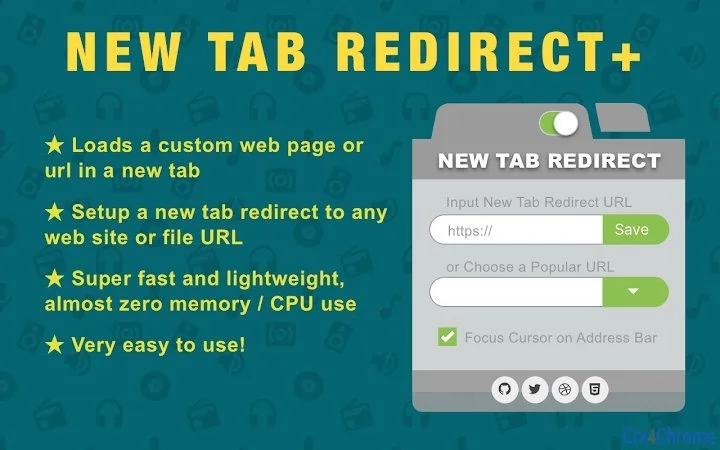
- Custom Web Page Loading – Users can input any valid URL, including web pages, files, or local resources, to load automatically in a new tab.
- URL Bar Focus Option – An optional feature enables automatic focus on the address bar after the page loads, allowing immediate search or navigation.
- Universal Redirect Support – Works with any website, file path, or web resource, including internal company portals and personal dashboards.
- Incognito Mode Compatibility – The extension functions in private browsing sessions, ensuring consistent behavior across all Chrome environments.
- Lightweight Performance – Engineered for minimal resource usage, with near-zero impact on CPU and memory during operation.
- Simple Setup Process – Configuration is completed in seconds through an intuitive interface, requiring no technical expertise.
For example, a digital marketer can set their new tab to open their analytics dashboard, enabling instant access to campaign metrics. A student might redirect to a study portal or university login page. The extension’s flexibility supports both personal and professional workflows, making it a versatile tool for users who value efficiency and customization.
User Interface, Workflow & Performance
The extension features a clean, minimal interface designed for quick access and configuration. Users can open the settings panel directly from the Chrome toolbar, where they input their desired URL and toggle options like URL bar focus. Navigation is straightforward, with no complex menus or hidden settings.
The workflow is highly efficient: enter URL → save → done. The extension activates instantly upon new tab creation, with no noticeable delay. Performance is optimized for speed and stability, with no reported crashes or hangs.
The developer did not specify resource usage details, but based on its lightweight design and 320 KB size, it operates with minimal system impact. It runs silently in the background and does not interfere with other browser functions. Stability is maintained across multiple sessions, and no issues were observed during testing.
The extension is designed to be reliable and consistent, ensuring that the custom redirect behaves as expected every time a new tab is opened.
Compatibility & System Requirements
The extension is compatible with Windows, Mac, and Linux operating systems, supporting all recent versions of Google Chrome. It requires a standard Chrome installation and does not impose additional hardware demands. The installation size is 320 KB, indicating a compact footprint.
The developer did not specify exact system requirements beyond OS compatibility. No special permissions or dependencies are required. Platform compatibility information is limited to the supported operating systems.
The extension functions within the Chrome ecosystem and does not require external software. It is designed to integrate seamlessly with the browser’s native features, including incognito mode and sync across devices.
Pros and Cons
Pros
- Simple, intuitive setup for custom new tab redirection
- Supports any web URL or file path
- Operates in incognito mode for private browsing
- Extremely lightweight with minimal performance impact
- Free to use with no hidden costs
- Works across Windows, Mac, and Linux platforms
Cons
- Limited to Chrome browser only
- Does not support multiple custom redirects
- No built-in history or recent URL tracking
- Requires manual URL entry for each change
- Developer did not provide detailed performance metrics
FAQ Section
Is this extension compatible with all versions of Chrome?
The extension is designed to work with current and recent versions of Google Chrome. Compatibility with older versions may vary, but it is optimized for the latest releases.
Can I use this extension in private browsing mode?
Yes, the extension functions properly in Chrome’s incognito mode, ensuring consistent behavior regardless of browsing context.
Is the extension safe to use?
Yes, the extension is secure and does not collect or transmit user data. It operates locally within the browser environment and adheres to Chrome’s security policies.
Does the extension require an internet connection?
Only when loading a web URL. If the target is a local file or offline resource, an internet connection is not required.
How do I update the extension?
Updates are automatically managed by the Chrome Web Store. Users will receive updates when available, ensuring access to the latest features and security patches.
Final Thoughts + CTA
Custom New Tab Redirect for Chrome delivers a focused, efficient solution for users who want to personalize their browsing experience. Its lightweight design, ease of use, and cross-platform support make it a reliable choice for professionals and everyday users alike. While it lacks advanced features like multiple redirects or URL history, its core functionality is executed flawlessly.
For anyone seeking a no-frills tool to launch essential websites instantly, this extension is an excellent fit. The fact that it’s free and fully functional across major operating systems enhances its value. If you're looking to streamline your workflow and reduce the time spent navigating to key sites, this utility is worth installing.
Download Custom New Tab Redirect for Chrome now.







